Latch Tuner
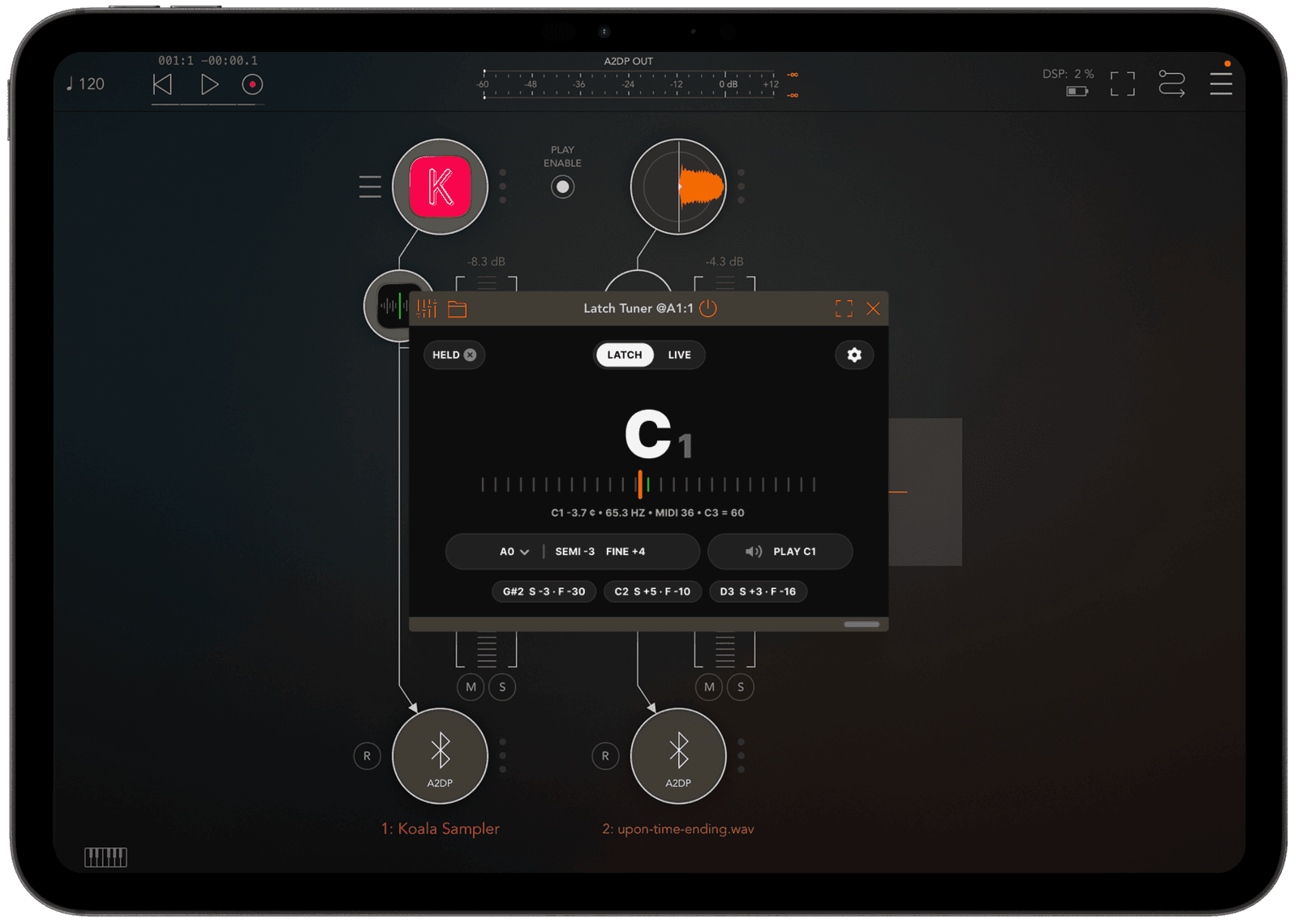
Latch Tuner is a pitch detector with transient-aware capture-and-hold — it skips the attack, measures the body of the note, and keeps the answer on screen after the sound has ended. Insert it on a channel as an AUv3 effect, or open the standalone app and use the mic. Built for one-shots, chops and 808s: the sounds ordinary tuners give up on.
Features
- Capture-and-hold. Transient-aware: it skips the attack, measures the body of the sound, and holds the reading after the sample has ended. Nothing to catch before the needle blanks.
- The two numbers your sampler wants. Pick a target note and it does the conversion — detected E3 −26.5 ¢, target C3, and it reads SEMI −4 · FINE +27. Type them into the pitch controls, retrigger, done.
- It tells you when it isn't sure. A gliding 808 or a reading that wobbles between octaves is flagged instead of shown as a plain answer. Built for single notes: a chord reads as one of its notes, usually the root. Noise and washed-out chops report no clear pitch, because there isn't one.
- Capture history. The last few results stay on screen, so you can work through a whole kit and compare without writing anything down.
- Audition the target. Tap PLAY to hear the target note against the sample and decide with your ears. Below ~80 Hz it adds an octave-up partial, so subs are still audible on a device speaker.
- Speaks your sampler's octave. Samplers disagree about octave numbers, so the readout shows its convention next to every answer, and a C3/C4 toggle matches it to yours. It can't silently put you an octave off.
- LIVE mode. A straightforward in-line tuner for guitar, synth and voice, docked in a corner of the session. Stop switching apps to tune.
Demonstration
Use cases
- Glue a chop to the track — read the sample, set the target key, type SEMI and FINE into your sampler.
- Label a sample library — work through old one-shots and find out what they actually are.
- 808s and subs — reads down to 25 Hz, below where most tuners stop.
- Tune an instrument — LIVE mode for guitar, bass, synth and voice, without leaving the session.
Details
- Bit-exact pass-through. Audio is pulled straight through untouched and latency is reported as zero. The audition tone is the one documented exception, and only while it is sounding.
- Monophonic, 25 Hz – 5 kHz. Accurate to ±1 cent, verified at 44.1, 48, 88.2 and 96 kHz.
- Adjustable reference pitch. 440, 432, 442 and the rest.
- Nothing leaves the device. No account, no analytics, no network code at all. Audio is analysed on device and never recorded or uploaded.
Requirements
- iPhone and iPad, iOS/iPadOS 16 or later. Runs as an AUv3 audio-effect plug-in — verified on device in AUM, Koala and GarageBand — or as a standalone app that listens through the microphone.
- One-time purchase. No subscription, no in-app purchases, no ads.
FAQ
What does "latch" actually mean?
Ordinary tuners are built for long, sustained notes. Play a one-shot through one and the needle jumps around during the attack, then goes blank before you can read it. Latch Tuner skips the attack, measures the body of the sound, and holds the answer on screen after the sample has ended. Play the next hit and it measures again on its own — there's nothing to reset.
Will it work in my host?
It's a standard AUv3 audio-effect, so it should load anywhere AUv3 plug-ins do. I've verified it on device in AUM, Koala and GarageBand. Look for it under "Supervised."
Does it change my audio?
No. Audio passes through untouched and bit-exact — there's no copy step for it to go wrong in. The one exception is the audition tone, which mixes a quiet sine into the output while you're holding PLAY, and only then.
Why does it sometimes say HELD ?
That's the sureness flag. If the pitch wandered while it was measuring, the readings scattered or split, or there was too little clean signal to be sure, you get HELD ? instead of a plain reading — the number is still there, but it's telling you not to trust it as far.
What's the C3 / C4 setting?
Which octave number the readout puts on middle C. Samplers disagree about this, and it's the most damaging silent error in the category — you tune a sample perfectly and it lands an octave out. The readout shows its convention next to every answer, and the toggle matches it to whatever your sampler uses.
Does it work on chords?
It's monophonic, by design: built for single notes, 808s and one-shots. A chord will usually latch its root or the octave below it, and it won't always be marked HELD ?. To tune a chord sample, tune from one of its notes.
Do I need a host?
No. The standalone app does the same detection through the microphone, which is the quickest way to tune an instrument or read a sound playing in the room. The AUv3 version needs no permissions at all — it only reads the audio already passing through the channel.
Is there a trial?
No. The App Store doesn't do trials for paid apps, and I'd rather keep this a one-time purchase than turn it into a subscription to get around that.
Release notes
v1.1 — October 27th, 2026
- Improved: HELD ? now appears only when the reading itself is in doubt: the pitch moved during the capture, the note wobbled between octaves, or there was too little clean signal. Before, a quiet or noisy microphone signal flagged most readings with a question mark, including correct ones; expect fewer of them through the mic.
- Improved: In a room with background noise, a measurement now ends when the note fades into the room instead of running on into its fading tail.
- Fix: Some notes could read an octave or more too low with no warning. The open D string on a guitar read D2 instead of D3, usually with no warning; it now reads D3 in our recordings. A weak note over room hum could read several octaves down (an A3 shown as B0); that now happens much less often.
- Fix: Clean tones between about C#3 and E3 (roughly 140–159 Hz), such as sine or synth notes, could read about two semitones sharp with no warning. They now read correctly.
v1.0.1 — September 17th, 2026
- New: First run now explains that readings hold. A one-time banner says readings stay on screen until the next note. The most common question since launch has been how to "reset" the tuner. The answer is that you don't have to: playing the next note measures it automatically. The HELD pill is there to clear the screen when you want it blank, not to re-arm anything.
- New: Tap LATCH tab item to clear and measure again. Tapping LATCH while it's still measuring does nothing, so it can't interrupt a capture in progress.
- Improved: Hints now appear in the smallest plugin size. The compact plugin frame previously showed no hints at all, which made it the one place the app never explained itself.
- Improved: The hint banner is sized to its text instead of stretching the full width of the window.
- Fix: Bigger tap target on the LATCH / LIVE toggle in small plugin frames.
v1.0 — August 24th, 2026
- Initial release.